
你的位置:首页 > 互联网IT
IIS7 http自动跳转到https,http怎样跳转HTTPS
1.下载安装URL重写模块:Microsoft URL Rewrite Module
IIS7需要先确认是否安装 “URL 重写” 或者 “URL Rewrite” 模块 , 如果您已经安装可以跳过
“URL重写” 模块下载地址
微软下载地址(64位):http://www.microsoft.com/zh-cn/download/details.aspx?id=7435
微软下载地址(32位):http://www.microsoft.com/zh-cn/download/details.aspx?id=5747
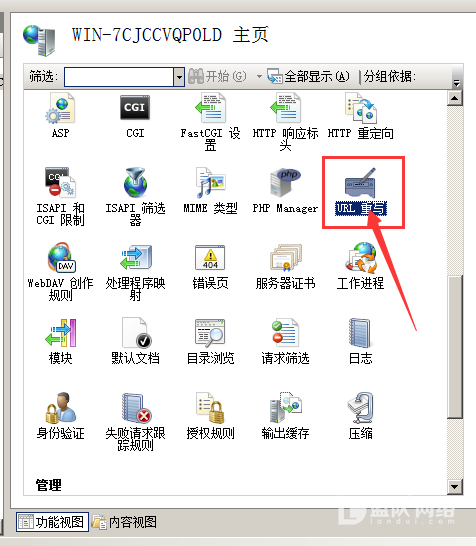
下载安装后我们重启IIS,再打开后会发现在功能视图中又多出了个URL重写的功能
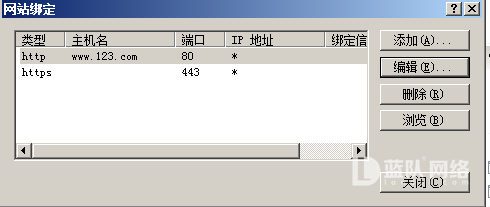
2、对站点进行域名绑定
我们需要将https和http绑定在需要的站点上
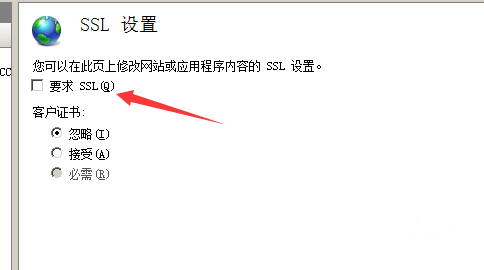
3、进程SSL设置
在要求SSL的选择前取消勾选
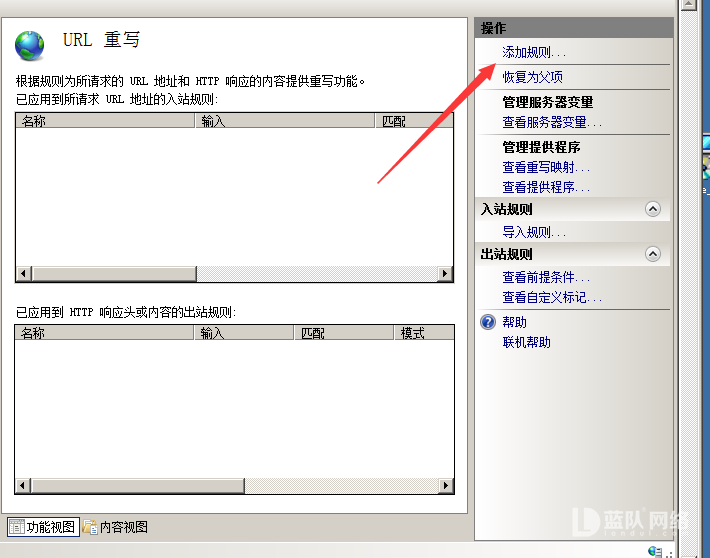
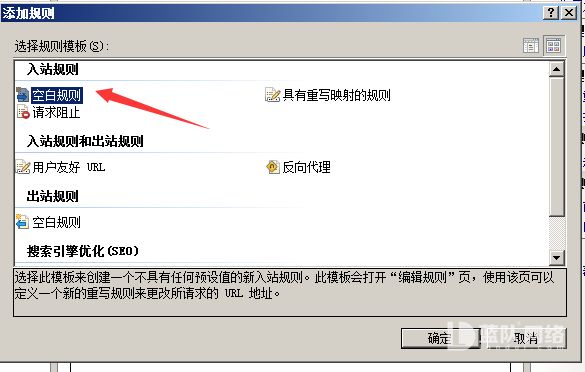
4、在URL中新建规则
新建一个空白规则,让http的访问跳转到https上
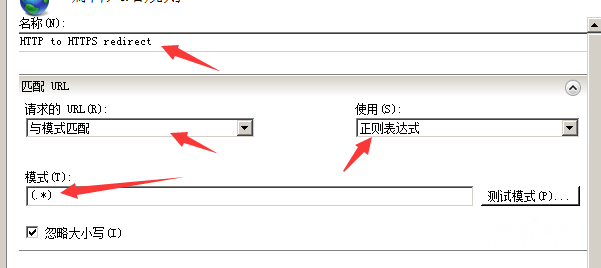
起一个名字例如HTTP to HTTPS redirect
模式:(.*)
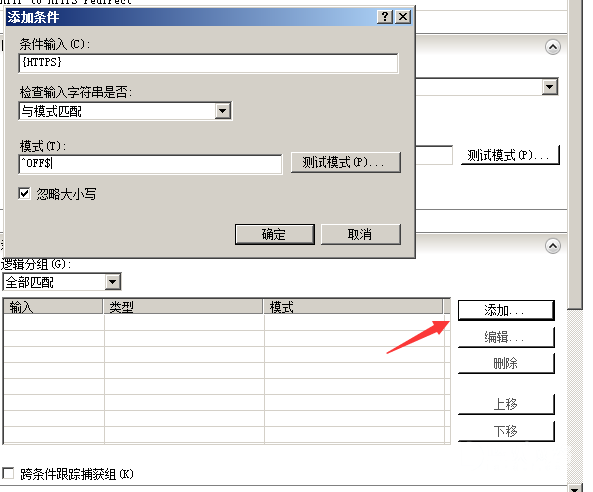
添加条件:{HTTPS} 模式:off 或 ^OFF$
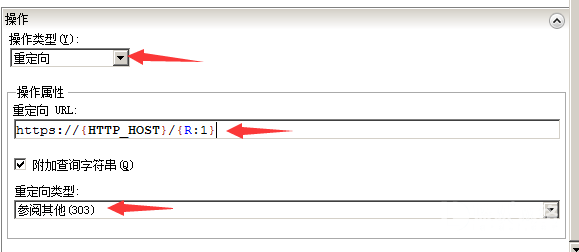
在操作设置中选择重定向:https://{HTTP_HOST}/{R:1}
重定向类型:已找到(302) 或 参阅其它(303)
选择应用就可以了
.Web.config添加
收工!~
高级版(直接把伪静态添加到web.config)
<?xml version="1.0" encoding="UTF-8"?>
<configuration>
<system.webServer>
  <rewrite>
   <rules>
    <rule name="HTTP to HTTPS redirect" stopProcessing="true">
     <match url="(.*)" />
     <conditions>
      <add input="{HTTPS}" pattern="off" ignoreCase="true" />
     </conditions>
     <action type="Redirect" redirectType="Found" url="https://{HTTP_HOST}/{R:1}" />
    </rule>
   </rules>
  </rewrite>
 </system.webServer>
</configuration>规则如图所示,它会自己在根目录生成一个叫web.config的配置文件,代码如下所示
Markup
<?xml version="1.0" encoding="UTF-8"?><configuration>
    <system.webServer>        <rewrite>
            <rules>
                <rule name="301" stopProcessing="true">
                    <match url="(.*)" />
                    <conditions logicalGrouping="MatchAny">
                        <add input="{HTTP_HOST}" pattern="^lwseo\.cn$" />
                    </conditions>
                    <action type="Redirect" url="https://www.lwseo.cn/{R:0}" />
                </rule>
            </rules>
        </rewrite>
    </system.webServer></configuration>
Web.config添加
1 2 3 4 5 6 7 8 9 10 11 12 13 | <system.webServer> <rewrite> <rules> <rule name="HTTP to HTTPS redirect" stopProcessing="true"> <match url="(.*)" /> <conditions> <add input="{HTTPS}" pattern="off" ignoreCase="true" /> </conditions> <action type="Redirect" redirectType="Found" url="https://{HTTP_HOST}/{R:1}" /> </rule> </rules> </rewrite> </system.webServer> |
- 上一篇:网页层上面可移动代码
- 下一篇:网站APP生成器APK,安卓APP制作工具APK


- 发表评论
- 查看评论
【暂无评论!】发表评论: