
你的位置:首页 > 互联网IT
node端口转发,node端口映射,TCP端口转发映射,UDP端口转发映射,TCP转发映射,UDP转发映射,NodeJS编写简单TCP/UDP端口代理转发服务,端口转发,端口映射,node转发,nodejs转发,nodejs映射,node映射,tcp转发,tcp端口转发,tcp映射,tcp端口映射,udp转发,udp端口转发,udp映射,udp端口映射
支持系统:Windows 64/32位系统/Linux系统
功能:TCP/udp端口转发
性能:优越
软件:proxy-node-tcp-udp
Windows/linux下载地址:node-tcp-udp.rar
windows node 下载地址:node-v12.14.0-x86.rar
同类型:node-socket-proxy端口转发,node-socket-proxy-master端口映射,TCP端口转发映射:https://www.zhuguodong.com/?id=530
nodejs同类型转发映射软件:
TCP:https://www.zhuguodong.com/?id=604
node安装,nodejs安装,Windows nodejs安装,Linux nodejs安装:https://www.zhuguodong.com/?id=529
node-tcp-udp-proxy
nods.js实现的socket 端口代理转发,
用法:
修改proxy-tcp.js或者proxy-tcp-udp.js:
"tcp测试2": {
mode: "tcp",
bind: ["0.0.0.0", 8080],
server: ['8.8.8.8', 8080]
},
"udp测试1": {
mode: "udp",
bind: ["0.0.0.0", 808],
server: ['www.baidu.com', 808]
},
参数说明:
"tcp测试1": { #名称,多条名称设置不一样,支持中文英文数字名
mode: "tcp", #选择协议:TCP或者UDP
bind: ["0.0.0.0", 8080], #本地地址IP,本地转发端口
server: ['8.8.8.8', 8080] #远程域名或者IP,远程端口
},
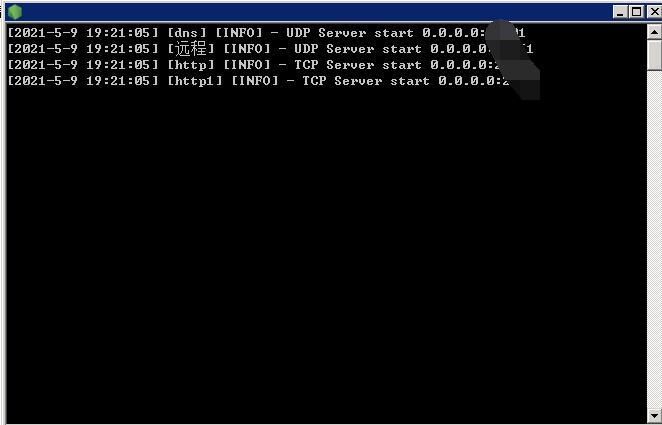
Windows/linux启动cmd:
node proxy-tcp.js
node proxy-tcp-udp.js
Windows系统:
安装:node-v12.14.0-x86.msi
查看:node -v
返回版本信息,比喻:v0.10.48
同目录下运行:node proxy-tcp.js
node proxy-tcp-udp.js
后台隐藏运行:https://www.zhuguodong.com/?id=520
Linux系统:
第一种:nodejs安装
安装:yum -y install nodejs
查看:node -v
返回版本信息,比喻:v0.10.48
同目录下运行:node proxy-tcp.js
node proxy-tcp-udp.js
后台隐藏运行:https://www.zhuguodong.com/?id=498
CentOS 7通过yum安装nodejs和npm失败方法,No package nodejs available.:https://www.zhuguodong.com/?id=540
1.升级node,下载 n管理包
npm install -g n
2.执行n 命令升级到v14.16.0
v14.16.0版本2021年2月23日
n 14.16.0 stable
v12.21.0版本2021年2月23日
n 12.21.0 stable
v10.23.3版本2021年2月9日
n 10.23.3 stable
3.重启centos7(必须).查看node版本,更新到14.16.0
reboot
第二种:nodejs安装
安装宝塔网站面板
软件商店:搜索node,安装
查看:node -v
返回版本信息,比喻:v0.10.48
同目录下运行:node proxy-tcp.js
node proxy-tcp-udp.js
Linux系统node安装:
参考文章:https://www.zhuguodong.com/?id=529
参考文章:
https://www.jianshu.com/p/d07477824270
编写TCP端口代理
创建:proxy.js文件
var net = require('net');//获取本地时间字符串function getDateStr() {
    return (new Date()).toLocaleString();}// 创建TCP代理function proxyTCP(key, conf) {
    let [bind, server] = [conf.bind, conf.server];
    let tcpServer = net.createServer((c) => {
        console.info(`[${getDateStr()}] [${key}] [INFO] - TCP Client connect ${c.remoteAddress}:${c.remotePort}`);
        let client = net.connect({ port: server[1], host: server[0] }, () => {
            c.pipe(client);
        });
        client.pipe(c);
        client.on('error', (err) => {
            console.error(`[${getDateStr()}] [${key}] [ERROR] - ${err}`);
            c.destroy();
        });
        c.on('error', (err) => {
            console.error(`[${getDateStr()}] [${key}] [ERROR] -  ${err}`);
            client.destroy();
        });
    });
    tcpServer.listen({ host: bind[0], port: bind[1], }, () => {
        console.info(`[${getDateStr()}] [${key}] [INFO] - TCP Server start ${bind[0]}:${bind[1]}`);
    });
    return tcpServer;}const proxyConfig = {
    "测试机 1.21": {
        mode: "tcp",
        bind: ["0.0.0.0", 8087],
        server: ['192.168.1.21', 9003]
    },
    "远程桌面 1.21": {
        mode: "tcp",
        bind: ["0.0.0.0", 13389],
        server: ['192.168.1.21', 3389]
    },
    "路由器 1.1": {
        mode: "tcp",
        bind: ["0.0.0.0", 8080],
        server: ['192.168.1.1', 80]
    }};const servers = {};for (let k in proxyConfig) {
    let conf = proxyConfig[k];
    if (conf.mode == "tcp") {
        servers[k] = proxyTCP(k, conf);
    }}
添加UDP端口代理
创建:proxy.js文件
const net = require('net');const dgram = require('dgram');//获取本地时间字符串function getDateStr() {
    return (new Date()).toLocaleString();}// 创建TCP代理function proxyTCP(key, conf) {
    let [bind, server] = [conf.bind, conf.server];
    let tcpServer = net.createServer((c) => {
        console.info(`[${getDateStr()}] [${key}] [INFO] - TCP Client connect ${c.remoteAddress}:${c.remotePort}`);
        let client = net.connect({ port: server[1], host: server[0] }, () => {
            c.pipe(client);
        });
        client.pipe(c);
        client.on('error', (err) => {//read ECONNRESET 主动中断
            console.error(`[${getDateStr()}] [${key}] [ERROR] - ${err}`);
            c.destroy();
        });
        c.on('error', (err) => {
            console.error(`[${getDateStr()}] [${key}] [ERROR] -  ${err}`);
            client.destroy();
        });
    });
    tcpServer.listen({ host: bind[0], port: bind[1] }, () => {
        console.info(`[${getDateStr()}] [${key}] [INFO] - TCP Server start ${bind[0]}:${bind[1]}`);
    });
    return tcpServer;}// 创建UDP代理function proxyUDP(key, conf) {
    let [bind, server] = [conf.bind, conf.server];
    const serverUDP = dgram.createSocket('udp4');
    serverUDP.on('error', (err) => {
        console.error(`[${getDateStr()}] [${key}] [ERROR] - ${err}`);
    });
    serverUDP.on('message', (msg, rinfo) => {
        console.info(`[${getDateStr()}] [${key}] [INFO] - UDP Client connect ${rinfo.address}:${rinfo.port} `);
        let client = dgram.createSocket('udp4');
        client.on('error', (err) => {
            console.error(`[${getDateStr()}] [${key}] [ERROR] - ${err}`);
            client.close();
        });
        client.on('message', (fbMsg, fbRinfo) => {
            serverUDP.send(fbMsg, rinfo.port, rinfo.address, (err) => {
                if (err) console.error(`[${getDateStr()}] [${key}] [ERROR] - ${err}`);
            });
            client.close();
        });
        client.send(msg, server[1], server[0], (err) => {
            if (err) {
                console.error(`[${getDateStr()}] [${key}] [ERROR] - ${err}`);
                client.close();
            }
        });
    });
    serverUDP.bind(bind[1], bind[0], () => {
        console.info(`[${getDateStr()}] [${key}] [INFO] - UDP Server start ${bind[0]}:${bind[1]}`);
    });
    return serverUDP;}const proxyConfig = {
    "http": {
        mode: "tcp",
        bind: ["0.0.0.0", 8087],
        server: ['192.168.1.1', 80]
    },
    "dns": {
        mode: "udp",
        bind: ["0.0.0.0", 53],
        server: ['118.118.118.118', 53]
    },
    "远程": {
        mode: "tcp",
        bind: ["0.0.0.0", 13333],
        server: ['192.168.1.17', 3389]
    },};const servers = {};for (let k in proxyConfig) {
    let conf = proxyConfig[k];
    if (conf.mode == "tcp") {
        servers[k] = proxyTCP(k, conf);
    } else if (conf.mode == "udp") {
        servers[k] = proxyUDP(k, conf);
    }}


- 发表评论
- 查看评论
【暂无评论!】发表评论: