
你的位置:首页 > 互联网IT
倒计时,顺计时,倒数日,记日子,网站运行时间,网站计时,网页计时,网页倒计时,网页倒计时,一
系统:
软件:网页
功能:倒计时,记时间,网站运行时间
下载地址一:
保存网页.html
<script>
function secondToDate(second) {
if (!second) {
return 0;
}
var time = new Array(0, 0, 0, 0, 0);
if (second >= 365 * 24 * 3600) {
time[0] = parseInt(second / (365 * 24 * 3600));
second %= 365 * 24 * 3600;
}
if (second >= 24 * 3600) {
time[1] = parseInt(second / (24 * 3600));
second %= 24 * 3600;
}
if (second >= 3600) {
time[2] = parseInt(second / 3600);
second %= 3600;
}
if (second >= 60) {
time[3] = parseInt(second / 60);
second %= 60;
}
if (second > 0) {
time[4] = second;
}
return time;
}
</script>
<script type="text/javascript" language="javascript">
function setTime() {
// 博客创建时间秒数,时间格式中,月比较特殊,是从0开始的,所以想要显示5月,得写4才行,如下
var create_time = Math.round(new Date(Date.UTC(2016, 7, 27, 0, 0, 0))
.getTime() / 1000);
// 当前时间秒数,增加时区的差异
var timestamp = Math.round((new Date().getTime() + 8 * 60 * 60 * 1000) / 1000);
currentTime = secondToDate((timestamp - create_time));
currentTimeHtml = currentTime[0] + '年' + currentTime[1] + '天'
+ currentTime[2] + '时' + currentTime[3] + '分' + currentTime[4]
+ '秒';
document.getElementById("htmer_time").innerHTML = currentTimeHtml;
}
setInterval(setTime, 1000);
</script>
<div align="center">
<table>
<tbody>
<tr class="firstRow">
<table width="325" border="0">
<tr>
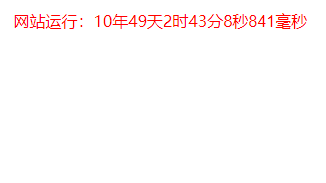
<td width="250"><font style="color: red;">网站运行:<span id="htmer_time" style="color: red;"></span></font><font style="color: red;" id="txt"></font><font style="color: red;" id="clock"></font><font style="color: red;">毫秒</font></td>
</tr>
</table>
</tr>
</tbody>
</table>
</div>
<style>
#clock {
font-size: 16px;
font-family: Arial, sans-serif;
}
</style>
<script>
function updateClock() {
const now = new Date();
const hours = String(now.getHours()).padStart(2, '0');
const minutes = String(now.getMinutes()).padStart(2, '0');
const seconds = String(now.getSeconds()).padStart(2, '0');
const milliseconds = String(now.getMilliseconds()).padStart(3, '0').slice(0, 3);
document.getElementById('clock').textContent =
`${milliseconds}`;
}
// 每毫秒更新一次
setInterval(updateClock, 11);
updateClock(); // 立即执行一次
</script>
参考来源:
项目地址:
官网地址:
参考地址:


- 发表评论
- 查看评论
【暂无评论!】发表评论: